
AI could read only 61% of a retailer's site, per Adobe. Our 7-step 2026 checklist preps your catalog, feeds, policies and bots for ChatGPT and your AI chat.

To prepare your e-commerce store data for AI, make your catalog, feeds and policies complete, structured and consistent, so any AI system can read them and quote them correctly. That means unique identifiers, standardized attributes, live prices and stock, and plain-language policies. Most stores are not there yet. In Adobe Analytics data reported by Magebit, large language models could read only 61% of a retailer's website on average.
Two readers use the same data. External assistants such as ChatGPT, Google AI Mode and Perplexity decide whether to send shoppers to you. Your own on-site AI chat decides whether those shoppers buy. Recomaze, as reported by Magebit, found that 60% of tested stores were not recommended for any of six purchase-intent queries. Missing or inconsistent data is the usual cause.
Source: Adobe Analytics, RecomazeAI tools struggle to read and recommend most stores: of a retailer's website readable by LLMs on average 61%; of tested stores not recommended for any purchase query 60%
This guide covers seven steps, in order:
Clean your catalog foundations.
Update structured data and feeds for 2026 rules.
Write policies and support answers your AI can quote.
Structure your catalog for on-site AI chat and search.
Connect to agentic commerce without overbuilding.
Unify customer and order data safely.
Decide which AI bots can read your store.
One set of store data serves two AI readers: external assistants that decide whether to send shoppers to you, and the AI chat on your own site that closes the sale.
Most stores are not ready. In Adobe Analytics data reported by Magebit, large language models could read only 61% of a retailer's website on average.
Start with the catalog: a unique SKU and GTIN for every variant, a standard taxonomy, and specs moved out of prose into separate attributes.
Advice written before mid-2025 is partly out of date. Feeds to Google now run on the Merchant API, shipping and returns are declared at store level, and variants are grouped with ProductGroup.
Write shipping, returns and sizing policies as short, specific statements in one place, because an AI chat can only quote what your pages say.
Connecting to an agentic protocol does not earn recommendations. Complete attributes, synced stock, genuine reviews and clear policies do.
Your data now feeds external AI assistants that send shoppers to you, and the AI chat on your own site that closes the sale. Both fail in the same way when data is thin or inconsistent. Fixing the data once improves both channels.
The external channel is worth the work. Adobe Analytics data, reported by Magebit, shows AI-referred shoppers converted 60% higher than every other channel in July 2026. But the sale usually ends on your store. Publicis Commerce and EMARKETER, as reported by Magebit, found that 69% of AI-assisted shoppers complete their purchase on a retailer's website or app. EMARKETER, also reported by Magebit, projects that retailer-native assistants will account for 54.1% of US AI-driven retail sales in 2026. Your own chat matters as much as your visibility in ChatGPT.
One finding shapes every step below. Protocol connectivity alone does not earn recommendations. Connecting to UCP or MCP standardizes how agents talk to your store. Getting shortlisted still depends on complete attributes, synced variant stock, genuine reviews and clear policies. Your own chat works the same way. It can only recommend the right variant or explain a return if those facts exist in a form it can read.
Shoppers ask an on-site chat about sizes, stock, delivery, returns and orders. Our analysis of real e-commerce chat conversations shows which questions come up most.
Start with identifiers, categories and attributes, because every AI system stalls at the catalog layer. Give every variant a unique SKU and GTIN, map products to a standard taxonomy, and move specs like size, material and compatibility out of prose into separate fields. A product with only a title, price and three images cannot be shortlisted for a detailed buyer question.
Supplier spreadsheets and ERP exports were built for fulfillment, not for AI. A common failure is one product under several names, such as 'iPhone 15 Pro', 'Apple iPhone 15 Pro 256GB' and 'iPhone Pro 15' loaded as three entries. Filters break, duplicates appear, and an AI cannot tell which record is current. Deduplicate supplier names and keep one canonical parent ID that links all variants.
A PIM such as Akeneo or Salsify helps, but it stores clean data. It does not create it. According to Anglera, migrating a 40%-complete catalog into a PIM leaves you with a 40%-complete catalog in a stricter container. Enrichment comes first.
If you use an LLM to fill gaps, set guardrails:
Keep rule-based work, such as unit conversion and character limits, separate from LLM output.
Use category-specific prompts and tell the model to leave a field blank when the source has no evidence.
Lock a glossary of brand names and part codes so translation never changes them.
Test each prompt on a sample of 10 to 20 SKUs before a bulk run, according to WISEPIM's guidance, including edge cases and multi-variant parents.
Send sizing, safety, material and compliance attributes to human QA before publishing.
Name attributes in the words shoppers type into your search, not supplier jargon. Use 'waterproof' as the filter label and keep the technical rating as its own attribute.
Plan time for this. According to eComNeo, a vendor estimate, a 5,000-SKU catalog with mixed inputs takes roughly two to three weeks for audit, enrichment and QA. Start with your best sellers.
Google's AI shopping surfaces, including AI Mode and Gemini, read the Google Shopping Graph, which is built from your on-page structured data and your product feed. Advice written before mid-2025 is now partly wrong. Move feeds to the Google Merchant API, declare shipping and returns at store level, and group variants with ProductGroup.
Merchant API replaces the Content API. According to Google's Merchant API documentation, the Content API for Shopping shut down on August 18, 2026. Any feed into Google Merchant Center must now run on the Merchant API.
FAQ rich results are retired. According to TopCited's summary of Google's notice, they stopped appearing in May 2026. Keep FAQ copy in plain HTML for shoppers and AI, but do not expect FAQPage markup to earn a rich result.
Shipping and returns move to store level. Declare store-wide ShippingService and MerchantReturnPolicy under Organization, using the OnlineStore subtype on your homepage or About page. Use product-level details only as overrides for specific SKUs.
Variants use ProductGroup. Add variesBy, such as size or color, and give each variant a unique SKU or GTIN. Otherwise an AI may quote one price for every size.
Never put Product markup on collection pages. Use ItemList and BreadcrumbList to show the catalog hierarchy instead. Keep reviews genuine too: according to TopCited, Google added an explicit guideline in July 2026 against fake and undisclosed incentivized reviews.
Bind your Schema.org Product markup in JSON-LD to live price and stock from your store database, not static theme blocks, so page, markup and feed always match. Then validate in this order:
Rich Results Test, for feature eligibility.
Schema Markup Validator, for full syntax.
Search Console URL Inspection, to see the rendered HTML.
Search Console merchant listing reports, for ongoing errors.
An AI chat agent answers only as well as the policy pages and help content it reads. Write shipping, returns, sizing, warranty and order-status answers as short, specific statements in one source of truth. When two pages disagree, the AI will eventually quote the wrong one.
Shoppers check. L.E.K., as reported by Magebit, found that 94% of AI users validate AI recommendations before completing a purchase. A vague returns page loses them at the decision point. A wrong answer costs even more. Salesforce reports that 43% of consumers stop shopping from a brand after a poor customer service experience. A chat that promises a free return you do not offer is poor service.
Rewrite each policy as statements an AI can quote word for word:
| Vague | AI-quotable |
|---|---|
| Returns accepted within a reasonable time. | You can return unworn items within [X] days of delivery for a full refund. |
| Shipping is fast. | Orders placed before [cut-off time] ship the same business day. |
| Contact us about sizing. | Our jackets run true to size. If you are between sizes, choose the larger one. |
Keep one page per policy and point every other mention to it.
Remove expired promotions and old sale dates. Use validFrom and validThrough on sale prices.
Complete your Terms of Service, Privacy and Refund policies. According to eSEOspace, Shopify requires them for its agentic channels.
We explain how to keep answers tied to the source in our guide to preventing AI chatbot wrong answers.
Do not feed your catalog to an AI as flat text. A catalog is a hierarchy of categories, products and purchasable variants with live prices and stock, and generic document chunking breaks it. Filter by hard constraints first, then combine keyword and semantic search.
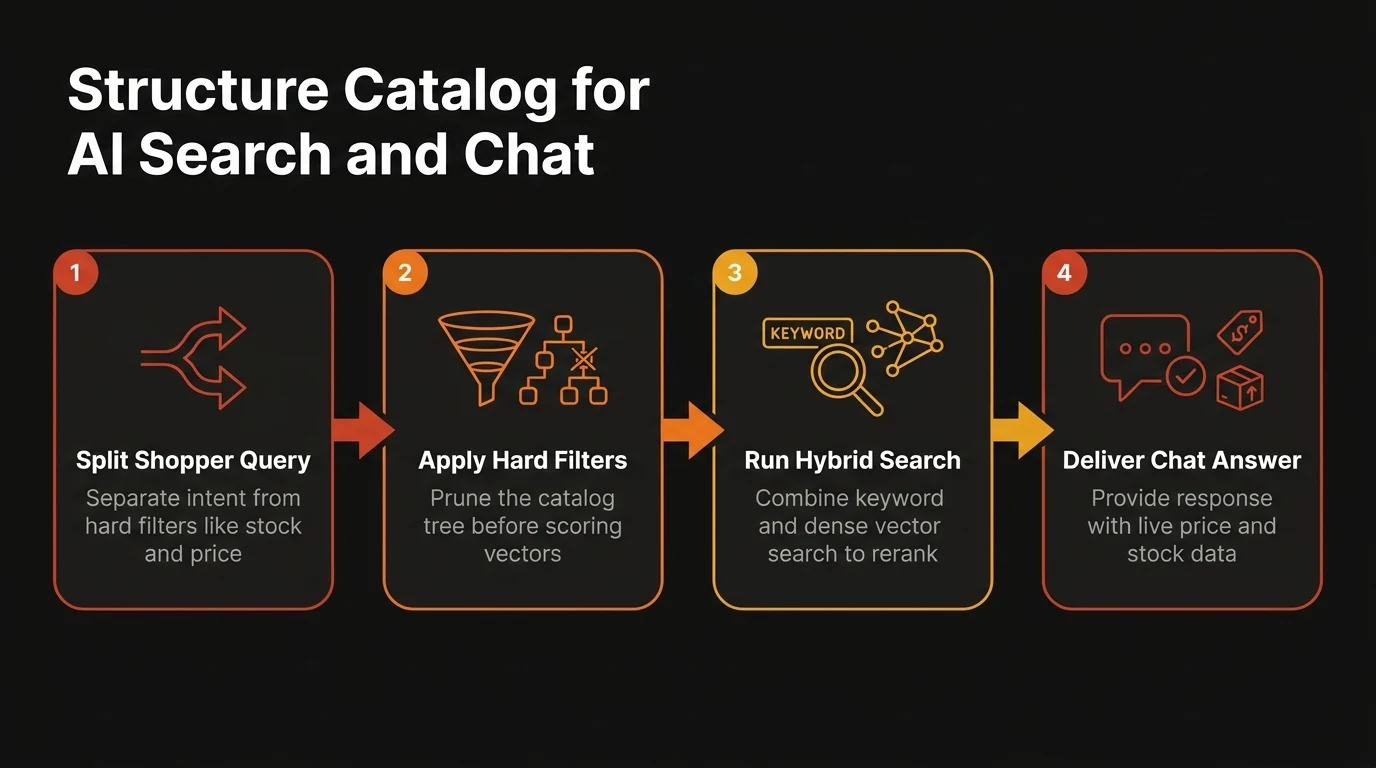
When product pages become generic text chunks, prices turn into strings inside paragraphs and variant links blur. The chat then suggests a jacket that is sold out in the shopper's size or above their budget. Research from Fin AI describes a better pattern:
Split the question. Separate intent ('warm jacket for hiking') from hard filters: in stock, price limit, category, ships to.
Filter first. Apply hard filters before vector scoring, so ineligible products never reach the ranking.
Use hybrid search. Keyword matching (BM25) catches SKUs and model numbers. Dense vectors catch use-case questions like 'bike for commuting'. Merge both lists and rerank.
Chunk by business object. Index product specs, category overviews and review clusters separately. Prefix every chunk with the parent product title and category path, so a washing-instructions block stays tied to the right sweater.
Ground in the current page. Pass the product page and selected variant to the chat, so it does not ask 'which product?' when the shopper is already looking at it.
Track zero-result rate, the share of searches and chat questions that return nothing useful. According to Digital Applied's on-site search playbook, the industry average is 10 to 15%, and Hello Retail cites a target of under 5%.
Structure is what fixes the old chatbot problem. The IBM Institute for Business Value found that one-third of consumers found early chatbot experiences so disappointing that they did not want to engage again. A chat that cannot answer catalog questions accurately repeats that mistake.
Agentic protocols standardize how AI agents talk to your store, but they do not make agents recommend you. If you run Shopify, the Universal Commerce Protocol and Shopify Catalog are on by default for eligible merchants, so your job is to verify them, not build them. Build a custom MCP server only when agents need data your platform cannot expose, such as off-platform ERP inventory or private B2B pricing.
Shopify and Google announced UCP in January 2026. According to eSEOspace and Verity Score, Shopify's buyer-facing Model Context Protocol tools now live at /api/ucp/mcp, and stores auto-generate /llms.txt and /.well-known/ucp so agents can find them.
Checkout differs by channel. OpenAI's Agentic Commerce Protocol launched with in-chat Instant Checkout, but according to Modern Retail, as cited by eSEOspace, OpenAI pulled back from it in March 2026. ChatGPT now works as a discovery referrer that sends shoppers to your checkout. Google's UCP checkout is limited to Australia, Canada and the US. Non-Shopify stores can use Shopify's Agentic plan or their own JSON-LD plus the Merchant API.
Run this audit each quarter:
Open /.well-known/ucp and /llms.txt and check the advertised endpoints.
Run a read-only catalog search against /api/ucp/mcp.
Compare the response with the rendered product page, so price and stock never drift.
Check bundles, subscriptions and customizable products separately, since agent checkout tools often exclude them.
An AI chat can only answer 'where is my order?' or personalize help if it can match the shopper to one customer record. Most matching errors come from inconsistent formatting, not from the matching method. Normalize identifiers first, match on exact keys, and keep payment data out of AI entirely.
Identity resolution follows a simple order, based on the steps cdp.com describes:
Standardize. Lowercase and trim emails, so USER@Example.com becomes user@example.com. Format phone numbers in E.164. Normalize addresses.
Match exact keys first. Use login, email or loyalty ID. Add probabilistic matching only with strict thresholds.
Avoid over-merging. Two people sharing a household device should not become one profile, or the chat may show one person's orders to another.
Keep it current. Split wrong merges and propagate privacy opt-outs to every linked profile.
Payment data stays out. Under PCI DSS v4.0.1, as Asenion summarizes it, keep cardholder data out of prompts, chat transcripts, logs and training sets. The chat needs order status and tracking, not card numbers.
Treat AI bots in three groups: training crawlers, AI search indexers and live fetchers triggered by a shopper. Blocking training crawlers like GPTBot does not remove you from ChatGPT search, but blocking OAI-SearchBot does. Enforce your rules at the CDN or firewall, because robots.txt is only advisory.
| Group | Examples | What blocking does |
|---|---|---|
| Training crawlers | GPTBot, ClaudeBot, CCBot | Opts content out of model training. No effect on ChatGPT search. |
| AI search indexers | OAI-SearchBot, PerplexityBot, Claude-SearchBot | Removes you from AI search answers and citations. |
| Live user fetchers | ChatGPT-User, Perplexity-User, Claude-User | Unreliable. Some operators say these may not follow robots.txt. |
Allow search indexers if you want to be cited. Decide on training crawlers by business policy. Then verify. According to Centinel's telemetry from July to October 2026, 94% of requests claiming to be GPTBot failed IP verification at the median organization. Check each bot against its operator's published IP list in your WAF and block impersonators.
Disclosure rules apply to your own chat. According to Asenion, EU AI Act Article 50 requires disclosing AI shopping assistants to EU consumers from August 2026. According to aicompliant.ai, California's CCPA automated decision-making (ADMT) rules apply from January 1, 2027. Label your chat as AI and keep manipulative urgency, such as fake low-stock warnings, out of its answers.
Measure readiness by testing what AI actually says about your store, not by counting fields. Ask assistants your top purchase-intent questions monthly, track your on-site chat's answer accuracy and zero-result rate, and watch AI referral traffic in analytics. Fix the 20% of products that drive most revenue first.
External check. Run a fixed set of buyer prompts across ChatGPT, Gemini and Perplexity. Log whether you appear and whether price and stock are right.
On-site check. Review a sample of chat answers for accuracy and track zero-result rate weekly.
Traffic. In Google Analytics 4, group AI assistant referrals into their own channel to see sessions, conversion and revenue.
Freshness. Refresh data and specs quarterly. According to Omnibound's compilation, AirOps and Kevin Indig found pages not updated for three months are three times more likely to lose AI citations.
The payoff can be large, though evidence is mostly single cases. Magebit reports that ChatGPT referral traffic for Ambler Surgical grew 872% year over year after store optimization. For your own chat, track questions resolved without a human, sales assisted by chat and after-hours coverage. Our guide to cutting customer service costs with AI shows how to run that math.
If you do only three things this week, fix identifiers and attributes on your best sellers, rewrite shipping and return policies as clear statements, and check that your feed runs on the Merchant API. Those three changes improve both external AI visibility and your own AI chat. The rest of the steps can follow over the next quarter.
Clean catalog foundations.
Update structured data and feeds.
Rewrite policies as quotable statements.
Structure the catalog for chat and search.
Verify agentic connections.
Unify customer and order data.
Set AI bot rules at the edge.
Parnidia's AI Chat Agent reads your catalog, policies and order data and answers shoppers in seconds on your website, email, Messenger, Instagram and WhatsApp. For the wider market, see our comparison of the best AI chatbots for e-commerce in 2026. To see how your current store data performs in an AI chat, book a demo.
Start by giving every product variant a unique SKU and GTIN, moving specs into standardized attributes, and rewriting policies as short, specific statements. Then update structured data and feeds to 2026 rules, including the Google Merchant API and store-level shipping and return markup. Structure the catalog so AI filters by stock and price before searching, unify customer records, and decide which AI bots can read your store.
It depends on catalog size and how complete your data is today. According to eComNeo, a vendor, a 5,000-SKU catalog with mixed inputs takes roughly two to three weeks for audit, enrichment and QA. Starting with your best sellers lets you see results before the full catalog is done.
No. A PIM such as Akeneo or Salsify stores and syndicates clean data, but it does not fill gaps, and moving an incomplete catalog into one leaves it incomplete. An AI chat agent needs accurate product, policy and order data from whichever system holds it. Parnidia's AI Chat Agent reads your catalog, policies and order data, so enriching your best sellers matters more than buying a new system first.
For Shopify stores, mostly not. OpenAI pulled back from native Instant Checkout in March 2026, according to Modern Retail, and Shopify now classifies ChatGPT as a discovery referrer. Shoppers click through and pay on your own checkout, sometimes inside ChatGPT's in-app browser. That makes your product pages, policies and on-site chat the place where the sale is won.
Blocking GPTBot only opts your content out of OpenAI model training and does not remove you from ChatGPT search. Blocking AI search indexers such as OAI-SearchBot, PerplexityBot or Claude-SearchBot does remove you from those AI answers. Decide on training crawlers by business policy, allow search indexers if you want to be cited, and enforce the rules at your CDN or WAF, because robots.txt is advisory and many requests fake bot names.
The 80/20 rule is the common observation that a small share of products drives most of a store's revenue. It is a rule of thumb, so check the exact split in your own sales data. For AI data prep, it means you fix identifiers, attributes and policies for your top sellers first, then work down the rest of the catalog.

Leo Mazzura
Co-founder & CEO @ Parnidia

Book a demo. We’ll show examples from similar clients and walk you through the software.


